
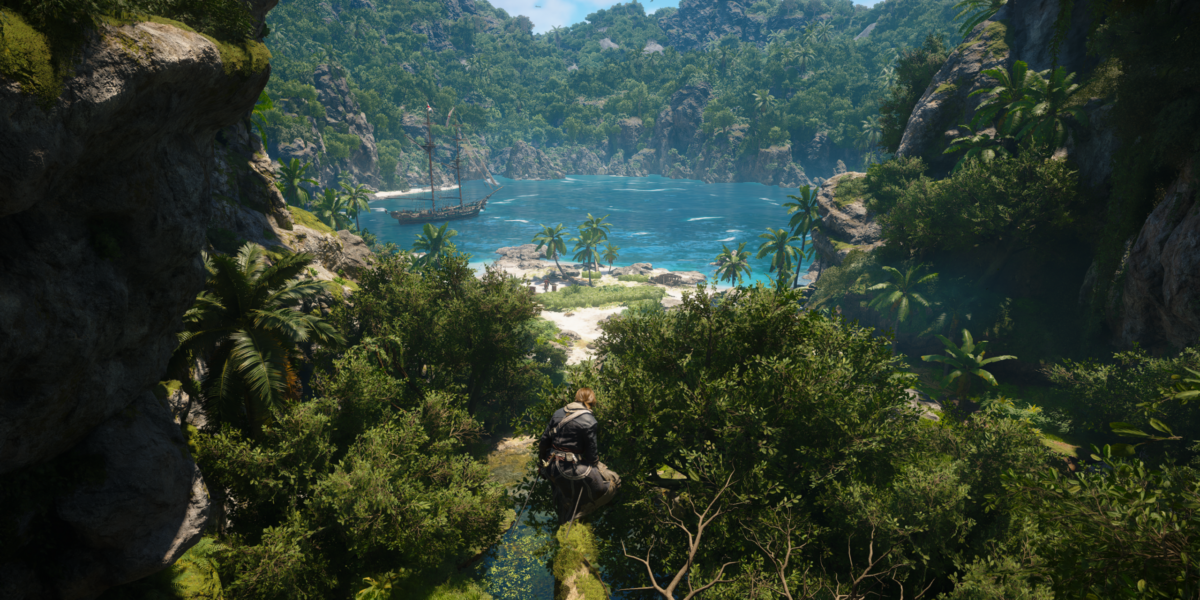
We were able to get a sneak peak at Assassin’s Creed Black Flag Resynced and assess the game’s accessibility.

| Type | Aventure Action |
| Publisher | Ubisoft |
| Developer | Ubisoft |
| Release Date | July 9, 2026 |
| Age Rating | 18 years and over |
| Physical | Visual | Hearing | Cognitive |
|---|---|---|---|
|
|
|
|
 Physical
 Visual
 Hearing
 Cognitive
 Full remapping
 Over 30 actions to prioritize
Is it still really necessary to introduceAssassin’s Creed after 14 main games and at least as many spinoffs?! It’s, in fact, one of Ubisoft’s flagship games, and it invites us to renew acquaintances with one of the game’s most popular releases, launched in 2013, Black Flag. You’ll find yourself plunged into the high age of piracy in the Caribbean during the 17th-century. Beyond this captivating world, it’s the naval battles which made it a success. Ubisoft also offered Skull & Bones two years ago, based on these battles.
You’re thus plunged into the Caribbean, somewhere between Nassau and Havana, to incarnate Edward Kenway, pirate by trade. He almost dies during a naval battle between a ship and a strange pirate by the name of Duncan Walpole. Persuaded to have found his fortune by stealing his identity, he goes to meet the Governor of Cuba, Torres, who is none other than a Templar. Kenway thus gets carried up in the shadow war between assassins and Templars.


Gameplay hasn’t changed, or at least it combines recent and original gameplay. Battles are closer to what we knew since Origins, that is, combat is more dynamic and based on your character’s position relative to the enemy. However, you can also find all of the original game’s content. The story is long and rich, with many side quests that will take you across the Caribbean.
It’s an open world, so there’s a large variety of activities, such as whale hunting, treasure hunting, and of course all sorts of objects and elements to collect throughout the world such as songs which you have to literally snatch out of the air while chasing them across roofs. These activities aren’t the main point, but they considerably improve the game experience for completionists.
The “RPG” part is not as central as in the past since there isn’t a highly-developed skill tree. However, you’ll be able to customize your personal equipment as well as your ship. This will allow you to adapt your game style with many weapons available to buy and collect.
With so many activities available, there’s always a risk of getting stuck when you have difficulty accomplishing certain tasks. We’ll, of course, take a look at the accessibility setup for this Assassin’s Creed Black Flag Resynced. We’ll look at all that in this article, but if you prefer, you can also watch our test video, in French, on Twitch!
In any case, you may note that accessibility is addressed as soon as you fire up the game! In fact, as soon as you start the game, in the middle of setting up graphics, you can set several accessibility settings on the fly. With one press of a button, you can activate a whole sleet of options in connection to a selected profile, such as physical presets, motion and camera, colors, visual, and audio presets. If you’ve been following this blog for awhile, you may already hear me grumbling, “What about cognitive accessibility??”

In addition, default settings allow you to customize all of the game’s text sizes, color and display in a more-or-less advanced way. You can then also add display of non-verbal information such as tone of voice. You can also activate environmental information to display gameplay sound in written form. These are essential points for those with hearing loss.
Now, let’s dive into the details based on your needs!
What if I have a physical disability? 6 / 10
We’re going to start, of course, with controller options. Regarding that, whether it’s with a keyboard and mouse, or with a joystick, Ubisoft has gotten us used to the perfect solution because it’s possible to remap every button in a totally free manner! You can even attribute directional controls to buttons if you can’t use a joystick. With each change, it displays if two actions are attributed to the same button, and therefore which ones to change to avoid a conflict.


That’s where the adventure genre creates a fundamental problem, because there are too many actions! With Black Flag Resynced, there are 36 actions to attribute to the 15 buttons of your joystick. That’s quite a conundrum and the proposed solution is to attribute several actions per button using a different triggering mechanism. For example, a simple attack is attributed to the RB button, and a charged attack to the RB button held down for two seconds. Another solution which has been used before are button combos which can be just as problematic. For example, for combat actions such as auto-shoot or kicks, you have to push RT + a button. You can replace the trigger by a button, but you still necessarily have to push a button + button combination. It’s therefore impossible to attribute these actions, however important they may be, to a single button press.
You’ll have to juggle between buttons like this while also getting an overall idea of where you are at the same time… and that’s just not possible. The generic joystick image is stationary and doesn’t seem to change according to selection, so you’ll have to navigate through the action descriptions with no graphic support, which will be problematic for people who have difficulties reading.


Regarding joysticks, you’ve got everything you need: highly-adjustible sensitivity settings, the possibility of inversing both joysticks, as well as the “leftie” configuration which flips joystick and trigger configurations. It’s also possible to inverse axes. Finally, it’s possible to finely adjust dead zones to manage jerky movements or to reduce the pressure necessary to have a maximum effect with joysticks and triggers. That’s just perfect.
The game also proposes options to reduce necessary minimum strength. For example, by pressing A for two seconds, your character will automatically start running. That’s perfect for freeing you up from keeping the ‘run’ button pressed down constantly or managing the joystick, but it has definite limits, because auto-run won’t follow your path. You’ll have to therefore manage every little movement, and in a sometimes very lively world, in cities full of NPCs and narrow streets, you’ll have to constantly be correcting your course.
Another interesting aspect for those who combine both keyboard and joystick controls is that control management is hybrid and you can freely switch from one to the other. For example, if you have a mouse or a trackball to get around and contacts to replace joystick buttons, this occurs seamlessly without any latency.


Full aim assist is also a useful option to depend less upon joystick control, but beware, there isn’t any total auto-aim for your next nearest enemy. The setting allows you to slow down while approaching an enemy, but you still need to aim, at least.
By the way, in combat, another point could be problematic, and that’s defense. In fact, to parry, you have to push the button at the exact same moment as the attack, so it’s reflex speed which could create a problem. The solution is to decrease difficulty level for fights so that you take less damage while also piling on the healing, knowing that you’ll easily find enough in the surrounding environment to refill.


For everything that involves gathering the numerous objects around you, there’s an “area loot” button which allows you to pick up every visible object without pushing Y for each one. That reduces fatigue.
Another point regarding combat is positioning. You need to be facing an enemy to parry, for example, but that requires a lot of fine joystick management to properly follow it. It’s possible to lock the camera onto an enemy and move on to the next one before the first enemy dies. One big limitation, however, is that it only works for living beings, not for objects such as mannequins. How is that limited, you may ask? Well, since boats are objects, there isn’t any way to lock the camera onto an enemy boat during naval battles, while waves keep rolling in and your target won’t stop moving around!
Other options will simplify related activities for you, such as “unlimited oxygen,” which allows you to manage better underwater. In fact, various activities will invite you to go diving in order to find treasure chests, but with gravity working differently underwater, you’ll need to move in 3D which requires more control. With time limited because of oxygen, it could be an obstacle to playing. This option removes time constraints.
So there are some very good things and perfect controller management, but there are also problems coming from the richness of the gameplay. There are so many actions that you have to make some difficult movements. In fact, button combos and long-holds are obligatory. There are also some rapid phases of QTE, such as defending, which demand very precise timing, or in-combat elimination while your adversary is thrown off-balance.
A score of 6/10 was confirmed live by Ivar, our expert. However, Nico, who plays with one hand, pointed out this difficulty during our pre-tests.
What if I’m visually impaired? 4,5 / 10
We went through visual accessibility with Ethan, our specialist on the subject, and there’s a lot to say.
One of the essential points when you have a visual impairment, especially if it’s a serious one, is that you’ll be receiving game information differently. SinceAssassin’s Creed Shadows, Ubisoft integrated a system of auditory pings consecrated to just that. You can activate a series of sounds which will give you game information. For example, running into a wall, arriving at the edge of a cliff, approaching a loot chest, or your health becoming low during combat. It’s very useful and Ethan noted some good changes since Shadows.


However, in reality, we noticed some important deficiencies. For example, there were indeed audible pings for loot and chests, but not for simple collectible objects. NPCs were not marked either, so you could go right by them without even knowing. However, the most awkward thing was enemies. There wasn’t any audible ping when you approached them in stealth mode, or, for example, to confirm your aim. So, that limited the effectiveness of an otherwise very useful option! Due to this, you have to identify enemies visually using eagle vision and count on icons to locate your objective.
There is, however, another way to effectively identify an object, and that’s through navigation. Just like with a GPS, when you activate it, a path appears on the ground to lead you to the objective. At sea, with a simple button hold you can even switch to auto-pilot all the way to the objective. However, that’s not available on land. The GPS appears, you can run automatically, but you won’t follow the path. So, you’ll have to monitor the path and constantly re-adjust your direction.
That’s where things get complicated, because the path is white with a small border. It’s perfect in dark environments, but most of the time you’re on dirt tracks where the path becomes difficult to see. Another problem is that the path is on the ground. As soon as you climb onto rooftops, you lose the path.
There isn’t any sound for key elements,therefore, no automatic navigation or recentering on the objective, so it’s already clear that the game won’t be playable by a blind person. From Ethan’s experience, it’ll be difficult with low vision. However, all of these aids are very effective, and you’d need “very little” of them for the aids to be completely useful.
There also isn’t any high contrast in the environment apart from Eagle Vision, which makes up for it, but it requires you to remember to use it regularly. When using Eagle Vision, enemies, hiding places, and points of interest indeed appear in color. By targeting these elements, you can place a permanent marker so that they remain visible, but this marker doesn’t have the benefit of high contrast.


However, there are many other interesting visual elements! Speaking of colors, Black Flag Resynced offers a “color preset” to address issues with red-green or blue-yellow color perception. This color option affects not only gameplay but also the interface, influencing things like item rarity in the menu, for example.


Regarding text, you can change quite a few things: subtitles, gameplay icons, and interface text. Speaking of interface, the menus aren’t infinite. When you reach the bottom of a menu, scrolling stops. Combined with specific sounds for each menu item, this allows you to find your way back to items using sound.
A major recurring flaw in recent Ubisoft titles is that a screen reader exists, but only if you play in English [sic.]. This is a significant drawback for the French-language version for those with reading difficulties.
An option allows you to adjust the contrast of the in-game interface. You add a background whose opacity can be adjusted for permanent elements like the compass, as well as for contextual elements like on-screen buttons. It’s missing a few elements, such as the health bar, but it’s still very helpful.
During combat, you can lock the camera onto an enemy and switch to the next enemy when the first one dies. This is perfect, because it frees you from having to move the camera to see an enemy. This option disappears at sea, however. You can’t lock onto a ship. This is understandable since you need to switch between weapons and move around to get into the right position. However, with so much movement, it becomes difficult to manage with a limited field-of-view. This is even truer when you’re in the middle of a storm where everything is dark with little contrast except for the health bar.
As for everything happening beyond your field of view, gunfire is indicated by alerts, for both ranged combatants and ships. However, for melee combat, there aren’t any indicators for off-screen enemy positions. So you need to lock on, shoot and hope you don’t miss!
In the end, by playing in story mode and thanks to all the available adaptations, Ethan was able to progress through the story. Some elements are still missing, though, and that’s a bit frustrating when you see excellent notions like sound pings that lack polish to be truly effective.
On paper, based strictly upon the adaptations listed, a score of 7 would have been possible, but in-game testing by those involved revealed greater difficulties than expected. That’s why the final score is 4.5, while remaining optimistic given progress shown between Shadows and Black Flag Resynced. Keep up the good work!
What if I have hearing loss? 8 / 10
Regarding hearing loss, the abundance of visual information is an advantage, unlike for the visual disability profile.
For example, Ubisoft has had complete mastery over subtitling for several years now. Their subtitling is highly sophisticated, with adjustments possible to font size, content and contrast. Non-verbal cues can be added, such as tone of voice and speaker’s position next to their name. We could also add legends and contextual information about ambient sounds relevant to the game, such as an off-screen blade being drawn from its sheath

![Non-verbal sounds can also be added to the text, [laughs] in this example.](https://i0.wp.com/www.game-lover.org/wp-content/uploads/2026/08/ACBFR-74-1024x576.png?resize=640%2C360&ssl=1)


Regarding sound, some excellent work has been done including many settings. Ambient sounds, such as music or immersive effects, are clearly distinguished from gameplay sounds. This allows you to focus on what’s essential. You can also activate focus mode to prioritize these important sounds.
You can also adjust dynamic range to avoid large variations in sound. However, there isn’t any mono sound mode for consistent sound on both sides.
The biggest challenge will be combat. During stealth mode, alerts and eagle vision will work to spot enemies, especially with the game’s legends enabled. However, in combat, only shots fired outside your line of sight are identified, not your opponents’ positions. You can therefore be surprised by an enemy who has got behind you. It’s annoying, but generally manageable.
What if I have a cognitive disability? 7 / 10
Assassin’s Creed Black Flag Resynced offers solid cognitive support, but with a few shortcomings that weaken the overall experience. Let’s take a look at them together!
The first requirement is to fully understand game mechanics. As is often the case, game start-up serves as a tutorial, showing you all the different activities. Unfortunately, you can’t replay it until you’ve gone through all the gameplay phases. Alternatively, it would have been nice to have a training camp from the beginning where you could test the game mechanics at your own pace.


Regarding comprehension, despite the game being in French [sic.], which makes the story easy to follow, text remains very prominent, and unfortunately, the screen reader is only available if you play in English. This will therefore be problematic for [French-language] players who struggle with reading, as the codex and instructions are largely text-based.
One positive point is that tutorials automatically pause the game while they provide explanations. This gives you time to read and understand without being rushed by the action. It’s a simple yet effective design choice, and one that’s all too often missing from action games.
Once in-game, there are lots of activities and you’ll need to find your way around. Fortunately, there are plenty of visual aids, such as permanent on-screen key reminders which appear at every possible interaction. This helps you remember which controls are important. The interface is well-designed for element size, display, contrast and options, allowing you to tailor your experience to your preferences. It’s also possible to remove blood for those who are sensitive to violent content.
Navigational assistance is also helpful. A compass displays current objectives along with remaining distance, and an arrow provides further information to indicate the player’s vertical position. It’s still less effective than an in-game mini-map, which a good part of the team deplored, because you have to orient yourself using an icon on a status bar, and that’s a more complex task than looking at a map.


An icon displaying your objective appears directly on-screen while it’s in your field of view. This is, therefore, more efficient. Finally, as a third level of assistance, you can display ground navigation by marking a point on your map and navigating to it using a long-press on the up arrow key. Be careful though, since the path often remains marked on the ground, and because you’re often on rooftops, you may lose sight of it.
On the map, everything is clearly indicated by icons categorized by type. You can navigate the map using a joystick, but if the map is busy and you’re looking for a specific type of icon, you can also open the menu and navigate directly between icons within a category. Furthermore, you do this using arrow keys, so there isn’t any need for a joystick.
Despite a few minor drawbacks, the game therefore provides good support to players regarding what to do.


In terms of concentration, we saw some great features with a fine-tuning of information displayed on-screen. You can also reduce sound volume to avoid being startled. Combat is intense, but when confined to a specific area, it doesn’t last too long. Saving the game is easy if you want to take breaks or play for short sessions depending on your concentration level.


The difficulty level is customizable, according to gameplay type. You can therefore choose your level according to your play style. If naval combat is challenging, you can set it to “Story.” Whereas if you mainly enjoy stealth, you can leave stealth on “Normal,” for example. This is a very welcome feature.
However, there are a few points of which to be aware. Navigating menus requires going through three levels before reaching accessibility options, which is long and potentially confusing for those who struggle with complex menu structures. While the compass effectively guides you to main objectives, freely explorable areas don’t provide any precise directions, which can lead to frustration or disorientation depending on player style.
Our opinion
Assassin’s Creed Black Flag Resynced illustrates both Ubisoft’s true progress in regards to accessibility as well as the limitations which a rich gameplay environment can cause, even if it’s done with good intentions.
In some areas, the design work is solid. The audio aspect is well-executed with complete subtitles, fine-tuning of sound and in-game legends. Ubisoft has clearly capitalized on its recent experiences. The cognitive aspect follows suit with consistent support, adjustable difficulty for each type of gameplay and well-designed navigational aids. These results have been proven through practice.
Regarding physical aspects, it’s more of a mixed bag. Remapping is excellent and joystick options are comprehensive. However, managing 36 actions over 15 buttons is an unsolvable riddle. Obligatory combinations and button holds aren’t a design oversight; they’re part of the gameplay. You can’t bypass them without removing a part of what makes Black Flag what it is.
Visual support is the most glaring weakness. Sound pings are an excellent idea, but they haven’t been fully carried out. Unseen enemies, non-automated land navigation and a screen reader only available in English are some notable weaknesses. Ethan experienced these problems firsthand, since the final product doesn’t live up to the promised options.
Overall, Black Flag Resynced is a game which is accessible to certain players, with real progression from Shadows, but it remains out-of-reach for others. The example of The Last of Us Part II reassures us that it’s possible, and that we’re getting closer step by step, so we can only encourage Ubisoft to continue down this path!